
Download Dryfta – Event Management Software for Universities & Non‑profits
Overview
Dryfta is a cloud‑based event management platform built specifically for universities, student societies, and other non‑profit organisations that run recurring conferences, workshops, career fairs, and social gatherings. The platform consolidates every phase of event planning—from initial promotion to post‑event analytics—into a single, secure dashboard. Organisers can design a custom event website, generate a mobile app, sell tickets, collect online payments, and manage on‑site logistics such as self‑check‑in and badge printing without ever leaving the system.
By interlinking tools like budgeting, polling, live discussion rooms, and real‑time reporting, Dryfta removes the need for multiple disconnected services, thereby reducing administrative overhead and improving the attendee experience. Its subscription model offers both flat‑rate monthly plans and pay‑per‑registration options, making it affordable for one‑off events as well as annual conference series. The platform also emphasizes data privacy, complying with GDPR and other regional regulations, which is crucial for educational institutions handling student information.
In short, Dryfta promises an all‑in‑one, scalable solution that simplifies event logistics while delivering actionable insights for future improvements.
Core Features & Tools
- Custom Event Website & Mobile App Generator – Drag‑and‑drop builder with responsive design, QR code integration, and push‑notification support.
- Ticketing & Online Payments – Supports credit cards, PayPal, Stripe, and campus‑specific payment gateways; includes early‑bird discounts and promo codes.
- Self‑Check‑in & Badge Printing – NFC/QR scanner compatibility, on‑site badge design, and batch printing for large audiences.
- Scheduling & Session Management – Interactive agenda builder, speaker profiles, and automated calendar invites for attendees.
- Live Discussion & Networking – Real‑time chat rooms, polls, surveys, and virtual networking tables for hybrid events.
- Budget & Expense Tracking – Integrated financial dashboard, cost forecasting, and exportable spreadsheets for audit trails.
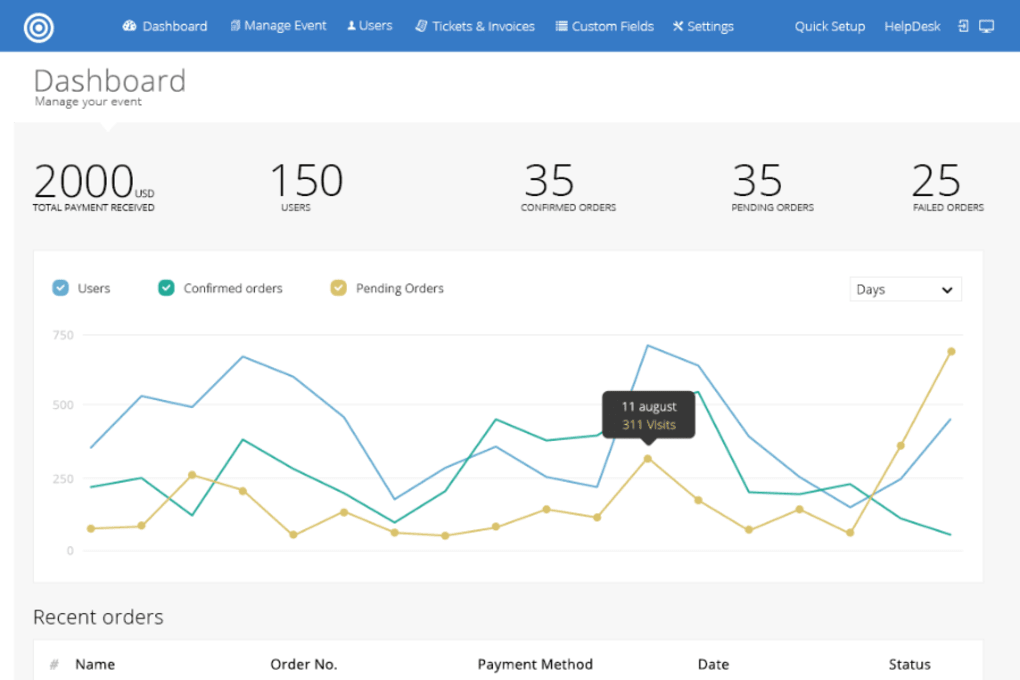
- Analytics & Reporting – Real‑time dashboards covering ticket sales, attendance, website traffic, and engagement metrics.
- Multi‑Level Permissions – Role‑based access for administrators, volunteers, sponsors, and speakers.
- Data Export & API Access – CSV, JSON, and webhook support for seamless integration with university CRMs and LMS platforms.
- Security & Compliance – End‑to‑end encryption, GDPR‑ready consent forms, and regular SOC‑2 audits.
Each feature is designed to work in concert with the others. For example, the ticketing module automatically feeds registration data into the self‑check‑in system, eliminating manual entry and reducing bottlenecks at the entrance. The budgeting tool pulls real‑time revenue numbers from ticket sales, allowing finance teams to adjust spending on venue or catering without leaving the dashboard.
Moreover, the live discussion platform can be toggled on or off for individual sessions, giving organisers granular control over audience interaction. The platform’s modular architecture also means that non‑profits can start with a basic package—website, ticketing, and check‑in—and add advanced capabilities like surveys or API integrations as their event portfolio grows. This scalability, combined with a clean, intuitive UI, makes Dryfta a compelling choice for both tech‑savvy student unions and smaller societies with limited IT support.
Installation, Usage & Compatibility
Getting Started – Simple Setup in Minutes
Dryfta is a fully hosted SaaS solution, so there is no need to download or install any software on local machines. Organisers begin by creating an account on the Dryfta website. The sign‑up flow guides users through a quick questionnaire to capture event type, expected attendance, and preferred payment methods. Once the account is verified, a personalised dashboard appears, and the wizard walks the user through the creation of the first event—starting with the event name, dates, and venue details.
Step‑by‑Step Usage
- Design the Event Hub – Choose a template, upload branding assets, and publish the website or generate a branded mobile app.
- Configure Ticket Types – Set pricing tiers, discount codes, and payment gateways; preview the checkout flow to ensure a smooth user experience.
- Build the Agenda – Add sessions, assign speakers, and enable interactive features such as live polls or Q&A.
- Set Up On‑Site Logistics – Print badges in bulk, configure self‑check‑in stations, and assign volunteer roles.
- Launch Marketing Campaigns – Use built‑in email tools or integrate with Mailchimp to drive registrations.
- Monitor in Real Time – Dashboard widgets show ticket sales, check‑in counts, and attendee engagement as the event unfolds.
- Post‑Event Analysis – Export reports, review survey responses, and store data for future event planning.
Operating System & Device Support (itemprop="operatingSystem")
Because Dryfta runs in the cloud, it is accessible from any modern web browser on Windows, macOS, Linux, ChromeOS, Android, and iOS devices. The mobile app generator produces native‑like progressive web apps (PWAs) that work offline and can be added to a device’s home screen. For on‑site check‑in, the platform supports iPad, Android tablets, and dedicated barcode scanners that connect via Bluetooth or USB. The badge printing tool is compatible with most major printers (Zebra, Brother, Epson) using standard drivers. This cross‑platform flexibility ensures that university IT departments can adopt Dryfta without purchasing new hardware, while volunteers can use their personal devices to manage queues and answer attendee questions.
Pros, Cons & Frequently Asked Questions
Pros
- All‑in‑one suite eliminates the need for multiple third‑party tools.
- Highly customizable event website and mobile app with drag‑and‑drop builder.
- Robust reporting and analytics for data‑driven decision making.
- Flexible pricing model suits one‑off events and recurring conferences.
- Strong security posture with GDPR compliance and regular audits.
Cons
- Learning curve for advanced features like API integration.
- Limited offline functionality for the web dashboard (requires internet).
- Premium support and some advanced modules are only available on higher‑tier plans.
FAQ (itemscope itemtype="https://schema.org/FAQPage")
Is there a free trial available for Dryfta?
Yes, Dryfta offers a 14‑day free trial that includes full access to all core features. No credit card is required to start the trial, allowing organisations to evaluate the platform risk‑free.
Can Dryfta handle hybrid events with both in‑person and virtual attendees?
Absolutely. The platform’s live discussion rooms, streaming integrations, and virtual badge system make it easy to blend physical and online participants into a single, unified experience.
What payment gateways are supported?
Dryfta integrates with Stripe, PayPal, Braintree, and major regional gateways. Universities can also connect campus‑specific payment systems through the API.
How secure is attendee data on Dryfta?
Data is encrypted at rest and in transit using AES‑256 and TLS 1.3. Dryfta complies with GDPR, FERPA (for U.S. institutions), and undergoes annual SOC‑2 Type II audits.
Can I export my event data for use in other systems?
Yes. All registration, financial, and survey data can be exported as CSV or JSON files. Additionally, webhooks and a RESTful API enable real‑time synchronization with CRMs, LMS platforms, and accounting software.
Conclusion & Call to Action
Dryfta stands out as a purpose‑built event management solution that addresses the unique challenges faced by universities and non‑profit organisations. Its comprehensive toolbox—spanning website creation, ticketing, on‑site logistics, and analytics—means event planners can focus on content and community rather than juggling disparate software. While the platform’s breadth can initially feel overwhelming, the intuitive dashboard and extensive documentation flatten the learning curve, especially for teams that invest in the onboarding webinars offered during the trial period.
Pricing flexibility ensures that both a one‑time student conference and a multi‑year alumni gala can find a cost‑effective plan. Security and compliance are baked in, which alleviates the administrative burden of data‑protection audits. In short, Dryfta delivers a secure, scalable, and feature‑rich environment that empowers non‑profits to run smoother, data‑driven events.
Ready to simplify your next campus event? Start your free 14‑day trial today and experience a unified platform that handles everything from ticket sales to post‑event reporting—all while keeping your data safe and your attendees engaged.



.png)



